Check out my new workshop on the six concepts in the Psychology of Gestalt: Gestalt Workshop link
I was very lucky to have studied art all the years I was being educated, from high school all the way through college. During those years I took just about every art class you can think up: drawing I, II, III, painting I,II,III, composition I, II, and III, watercolor, figure-drawing, pastels, printmaking, Art History, and some I can’t even remember.
I studied all the elements of visual design and composition, and not knowingly, applied them the moment I picked up a camera and looked through the viewfinder. I had found my medium because it was instant gratification. No longer did I have to worry about meeting some deadline and having to stay up all night (sometimes for more than one night) finishing a drawing or painting. I could do it all in a blink of the ‘eye’….so to speak!
In my online class with the BPSOP, and in my “Stretching Your Frame of Mind” workshop I conduct around our planet, I show my fellow photographers how to incorporate the elements of visual design into their imagery. I give each of them what I call my Artist Palette, and by the end of the class or workshop, that palette is filled with all the elements, including elements of good composition as well.
I talk a lot about right and left brain thinking. The left brain is the analytical side while the right side is the creative side. For example, if you were to look close up at a fence around a little league baseball infield, the left side would see a fence around a little league baseball infield. If you were to look at that same fence with the right side of your brain, you would see Pattern, Shape (actually diamonds), and Line; three of the basic elements of visual design.
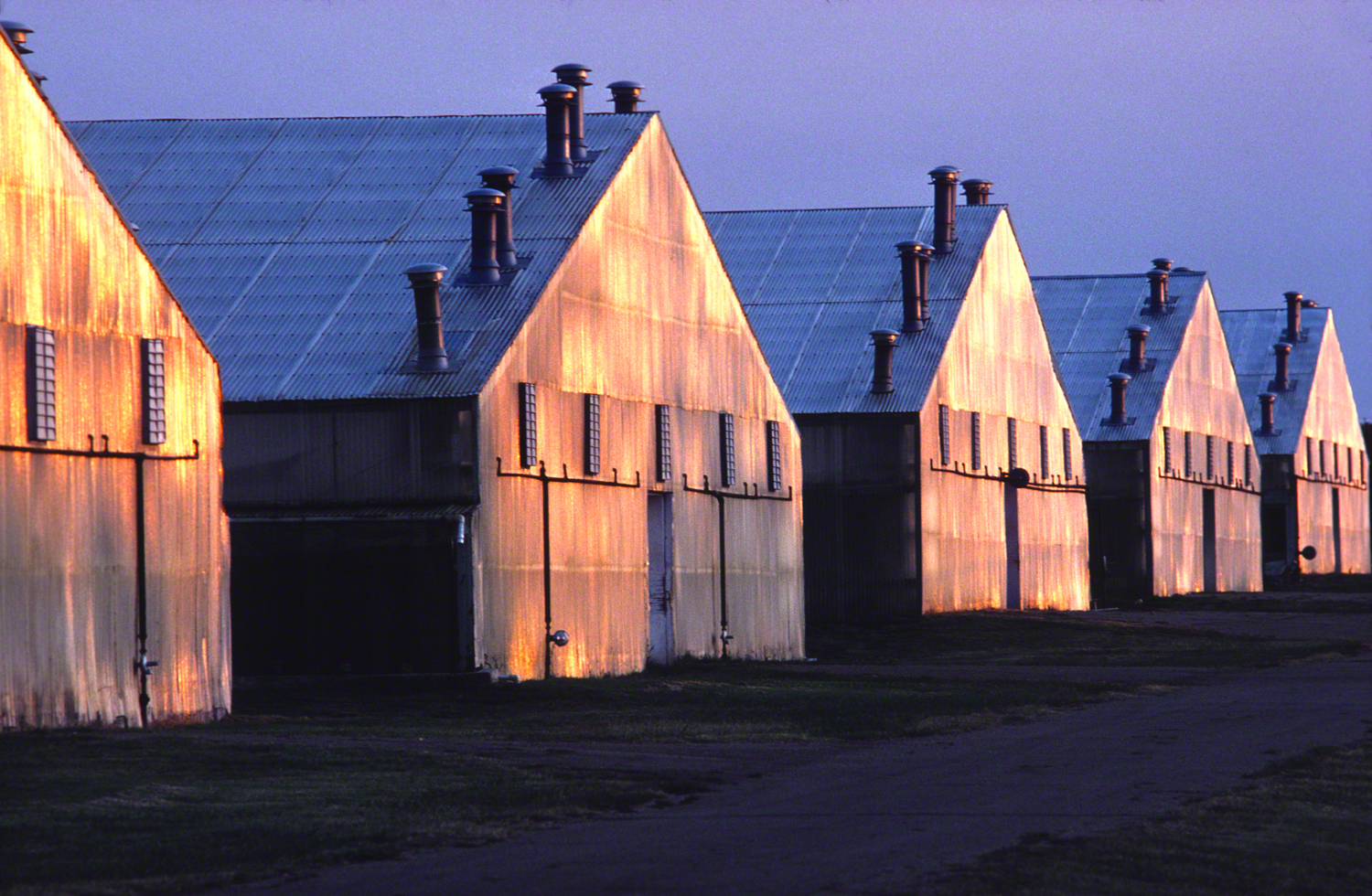
In the photo shown above, the left side of the brain sees a group of commercial greenhouses. Since I always look at things with the right side of my brain, when I looked at the buildings I saw Pattern, Texture, Line, Shape, and Form; all basic elements of visual design.
So my fellow photographers, the next time you strap on a camera and go out shooting, click off the left side of your brain and click on the right. You’ll be surprised at what you’ll start seeing.
Visit my website at: www.joebaraban, and follow me on Instagram: www.instagram.com/barabanjoe. Be sure to check on my workshop schedule. Come shoot with me sometime. It will be a whole new ballgame.
Check out my new workshop on the six concepts in the Psychology of Gestalt: Gestalt Workshop link
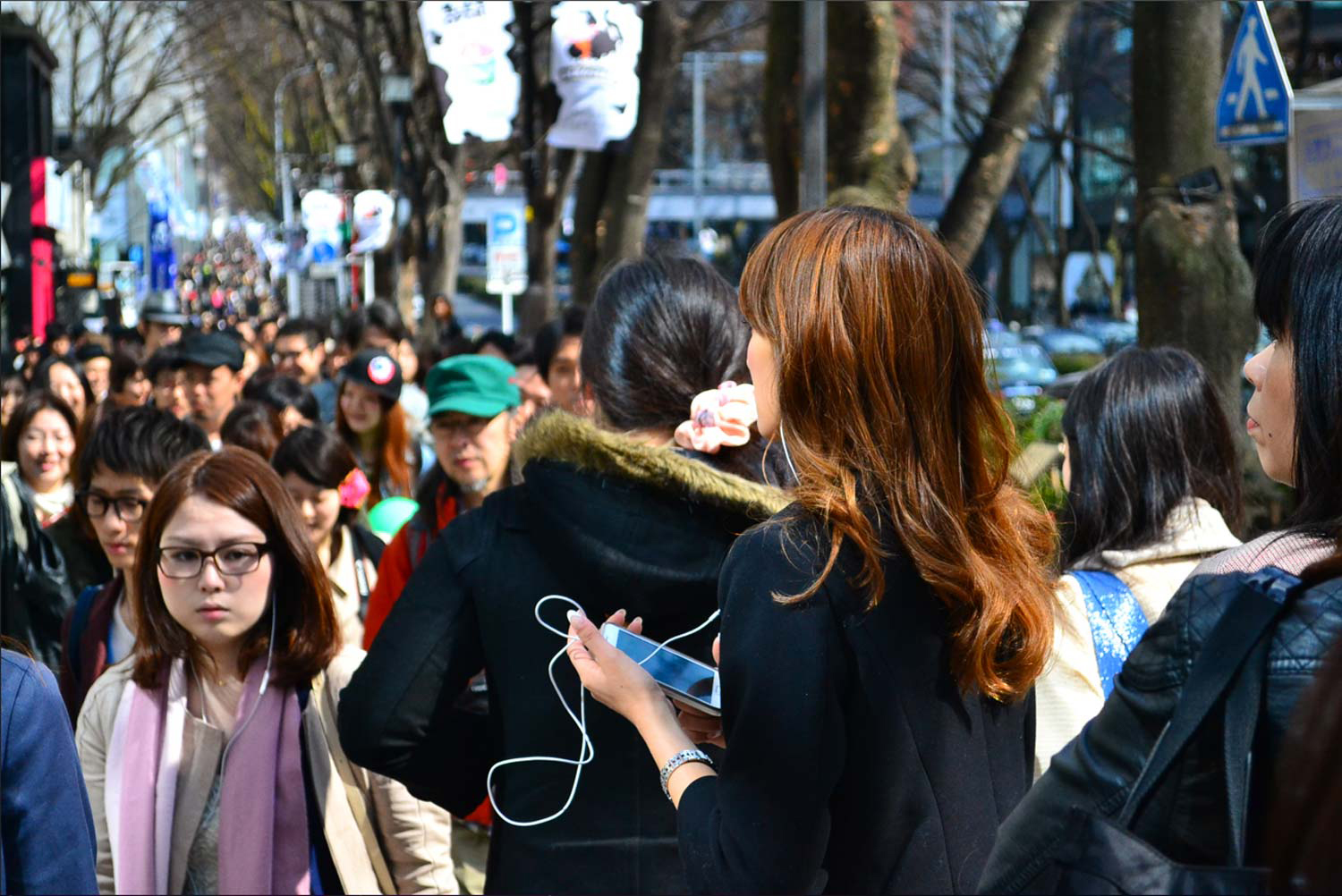
Charity sent me this photo to talk about. Here’s what she said:
“My question: How can I make this photo more gripping? This is a photo I want viewers to linger over – I want them to stop and think ‘Why has the girl with the phone stopped on this busy street? Why is the girl on the left annoyed? Why is the girl in the mid-ground with the badge on her hat so happy?’. No one I’ve showed my album to has lingered over this photo, only my landscapes seem to catch their attention.”
Charity,
First of all street shooting may seem easy to some, but in my opinion it’s not. I’ve certainly done my share over the years. If you want to experience real life street shooting imagine being chased down the street during the race riots while you were loading your Nikon F motor drive. That was my first opportunity to do some street shooting. That was around 1970 and I was shooting for United Press International. By the way, I was getting paid ten dollars a picture “if they transmit”. What that meant was that they had to like it for me to get paid.
Ok, let’s talk about your photo:
As I always tell my online students with the BPSOP, and the students that take my “Stretching Your Frame of Mind” workshops I conduct around the planet, you won’t always be around to explain your thought process to the viewer. It’s going to have to stand on its own and be what I refer to as a “Quick Read”.
In your photo, you may have felt the minimal vibrations given off by the people in the crowd, but the viewer won’t…why?
Our culture (the one currently subsiding in the US), has been bombarded with a lot of dumb reality shows and a whole lot of violence. We’re use to it, and to a lot of the population look forward to more and more and more. We get off to seeing people get angry on the TV. Angry or sick enough to kill a lot of people in just one hour. Actually, if you take away the commercials (which by the way are also getting violent) there’s a lot less than one hour.
So, you ask me how do you get people to “linger longer”? There will have to be a lot more going on in this photo than the subtleties you’re stating. The first thing you’ve said is, “Why has the girl with the phone stopped on a busy street?” The problem with this is that you’ve stopped all the action in your frame so it really doesn’t look like she has stopped. Btw, it looks like she’s blowing a bubble that just popped.
You asked, “why is the girl on the left annoyed?” Truth be told, she doesn’t look annoyed to me. If you want people to come off looking annoyed, then make sure the viewer can see that and not let it be something you think may be happening.
You asked, “Why is the girl in the mid-ground with the badge on her hat look so happy?” She’s sooooo out of focus, and surrounded by lots of other out of focused faces that I would be very surprised if the viewer would pick up on that.
Here’s one of my photos I shot on Mardi Gras day in New Orleans. What feeling do you get when looking at it? Do I need to be with you to explain it?
Here’s what I strongly suggest you do: Study the great street photographers like Bruce Davidson for one, and of course the most famous of them all is Henri Cartier-Bresson. If street photography is a new passion for you, then studying the masters should definitely be required reading.
The definition of psychology is the scientific study of the human mind and its functions.
Keep that in the back of your mind (on the right side, the creative side) when reading this description of the six principals of Gestalt workshop coming your way starting with the meet and greet Thursday, May 30th, 2024. The workshop to be held in Tyngsboro, MA.
Closure
First, let me give you some background information:
In the 1920’s a group of German psychologists, following the lead of their founder Max Wertheimer, developed a group of theories of visual perception they referred to as The Gestalt Principles. These principles made an attempt to describe how people perceive and process visual information when certain concepts are applied.
The origin of the word Gestalt is German/Austrian, and it simply means Shape, Form, or the Whole. It is often stated in this theory that, “The whole is greater than the sum of its parts.” It is this perception that has had the most controversy since the very beginning.
Some experts in the field say that each of the individual parts has meaning on their own. In other words, the whole is not necessarily made up of the sum of its parts, but different than the sum of its parts.
In my opinion, when we use these six Principles in our photography, we’re working with and structuring these parts (pieces of the finished puzzle) if you will) that will eventually make up the whole as in a completed photograph. These parts or elements are the elements of visual design. The elements we work on in my other classes.
The methods we use to gain attention to our photography will vary, but what’s important is how we manage what the viewer perceives and processes when looking at the visual information we lay out to him in the form of a photograph.
Humans rely on perception of the environment that surrounds us. Visual input is a part of our everyday life, and as photographers it’s our prime objective to present this visual information in a way that takes control of what the viewer sees when looking at our imagery.
Law of Common Fate
The more ways we can have the viewer move around our composition, while at the same time leaving and entering it, through the use of these concepts, the longer they will stick around. The more things we can get the viewer to discover while moving around the frame will also keep them around longer. Isn’t that what we want?
To be sure, the whole is important, but the parts that make it up are equally important. These concepts are visual rules (I hate rules) and I agree that once the parts are placed and the composition is framed, the whole does exceed the sum of its parts.
Here are the six principles that we’ll cover through assignments over the course: Closure, Figure-Ground, Continuance, The Law of Common Fate, Similarity, and Proximity.
Proximity
There are a lot of questions out there as to the number of concepts, but the important thing to remember is that these six principles will take our photos to new levels. To me, it’s so important to consider these concepts in our photography. However, I’m not suggesting that the only approach to taking memorable photos is a scientific or even a numerical one. What I’m suggesting is that great images can come when these concepts work in harmony with your photography.
One last thought is that when you look around, Gestalt is everywhere. It exists in our reality, and always has. It’s just that you may not have known the name. What’s important to know is that some of you have been using these principles since the time you were crawling around the floor looking for your pacifier.
For example, the age-old adage of whether the glass is half full or half empty falls under the concept called Figure Ground.
Similarity
This means is that when you show this representation, the half empty, and the half full images each carry the equal weight which creates tension…each threatens to overtake the other. It’s optimism verses pessimism.
I’ll be working with Nick DePasquale, an excellent photographer https://nickdepasqualephotography.com/ who you probably know, will take care of all the logistics and will be available to help with any questions that relate to Lightroom and Photoshop of which he is an expert…it being above my pay grade!!
BTW, Nick teaches a class in both lightroom and Photoshop.
Continuance
Once we have signed up the participants, I will send out links to all six concepts, with examples for you to study. Two weeks before the Meet and Greet, we’ll have a zoom session where we’ll talk about the six concepts, show examples, and answer questions.
At that point I’ll give you the first two concepts to work on and we’ll critique those (six images) the night of the meet and greet over pizza, wine, and beer.
Nick and I will be scouting ahead of time to determine the best places for the group to go to…at the best times. I’ll also pass out the schedule and final locations for the following days.
May 15th:Zoom session to review material show examples and give first assignment.
Meet and Greet: May 30th: @ 6PM Critique of six images with wine, pizza, and beer.
Friday, May 31st: We’ll be spending the day in Boston including sunset and the Blue Hour and will not be spending our time around the Fan Pier area.
Saturday, June 1st: We’ll have an extended critique in the morning and will spend the afternoon through sunset and Blue Hour at a place TBD.
Sunday, June 2nd: We’ll shoot in the morning, and the workshop will end at three.
Wednesday June 12th: Zoom session final critique.
The price of the workshop is $750.00…which will include three days of shooting, two Zoom classes, the meet and greet dinner and critique.
All the photographers who want to bring someone to the locations are welcome to, except for the critiques and meet and greet.
If interested, contact me at: joe@joebaraban.com
For those that have taken one or more of my workshops, you know that I run a professional in-depth learning experience. For those of you that haven’t, you can view my work at www.joebaraban.com and read just a few of my testimonials from some of my full eight-day workshops:
Alain
I recently completed my third workshop with Joe Baraban, and all I can say is that I will be coming back for more. All aspects of the workshop were fantastic. Joe’s approach to teaching, the shooting locations, the daily reviews, the accommodations, the planning and organization, and the communications were all at the highest level.
From the “meet and greet” reception the first night, to the final dinner, Joe paid strict attention to every detail to make sure we were well taken care of…all the time. Joe’s selection of locations is always diverse and challenging and present many, many opportunities for great shots and learning.
The daily reviews are a wonderful educational experience as you discuss your own work as well as the work of the other photographers. Joe teaches how to “make pictures”, not just take them. The quality and creativity in my images continue to ratchet up a notch with every workshop as I continue to learn from Joe.
I highly recommend Joe’s workshops and online classes.
John B
I wanted to learn more about Joe’s approach to visual design and making great photos after taking one of his online courses. As a former painter, I really relate to his focus on visual design elements as his artist’s palate and it all came to life in this workshop.
He is an excellent teacher, and it was wonderful to experience this with a group of very talented photographers who supported each other and did some great work. The format of learning the design principles and discussing them in relation to Joe’s images and the work from the class was a great way to learn – I look forward to future workshops.
Mary
They are absolutely second to none in that every detail is thoroughly covered and no costs are spared. Favorable locations are researched and scouted well in advance. Top notch accommodations and transportation are pre-arranged. Morning class and critiques are thought provoking, inspiring, and collaborative.
There is ample opportunity to share ideas, ask questions and discuss techniques. Students can learn not only from their own image critiques but also from their fellow photographers. Joe really wants to see his students grow.
This is quite evident in the dedication that he generously provides to each student. It must not go without mentioning that Joe has a following and it’s always wonderful to see everyone again from around the globe. We always have a great (and challenging) workshop together and inevitably walk away with lots of good images, tips, tricks … and of course stories. 🙂
I hope this has sparked an interest as this is the first time I have done an actual workshop just on the six concepts in Gestalt. It will offer those of you a great learning experience, promising to take your level of photographic awareness up a level…if not two or three, four, etc., etc.
This class will be limited to ten photographers. Your spouses, partners, or significant others, etc. are welcome to come to all the locations.
If you’re interested, I suggest you sign up sooner rather than later because as I said, there’s just nine spots opened now, as a woman I’m mentoring has already taken a spot.
Janet from Ohio sent in her photo of a woman fishing (I’m guessing fishing for Catfish) and as usual I like to have everyone read what she had to say. The reason is that so many of my fellow photographers have had similar situations, and have asked themselves the same thing. Here’s what Janet had to say:
“Hi Joe,
I was out shooting last night and getting ready to go home when I saw this woman with an orange/red jacket. She was fishing even though it looks more like she’s deep in thought. I thought the color of her jacket and the bucket would be a nice echo of the sunset. Even though I like the last sentence, I actually just thought the color would look great in a photo.
I am proud to report that I walked up to her and asked if she would mind if I took her picture. My first try was sad. The middle of the bridge was coming out of her head! So I tried again. As I looked through the view finder, I did make sure that everything in the picture was what I wanted in the picture.
I like almost everything about this photo. I like the negative space around the bridge, the colors – sunset, jacket etc., the reflection of the bridge and the lights from the other side. The one thing I don’t like is the white thing that looks like a bucket in the foreground. Actually it’s part of the dock and isn’t movable. I did little post processing. I lowered the highlights a little to increase the color in the sky.
So, what could I have done better?”
Janet (from Holland, Ohio)
The firs thing I want to commend you on is the fact that you approached her and asked to take her picture. In my online class with the BPSOP, and also in my “Stretching Your Frame of Mind” workshops, I’ve had so many photographers tell me that they have a hard time asking people to do something for them. It can be something as simple as asking them to move over a little to help the composition, or to ask to take their picture.
I call it “getting over the hump”, and after you do it once, it becomes easier and easier. Not only will you get a yes most of the time, but you’ll walk away smiling after making a new friend that’s also smiling. Btw, always offer to email them your photo.
FYI, she’s both deep in thought and fishing. Since fishing is one of my loves, I can tell you that it’s is a form of meditation…any silent thought is a way to meditate. I can assure you that her reverie will end in an instant the moment she feels the pull on her line!
That said, if you wanted to show her fishing, then you have to ‘show her fishing’. You know she was, but you’re not going to be around to tell the viewer what she’s doing. Show the fishing rod!!! One way to see that is to use my fifteen point protection plan: https://joebaraban.com/dont-forget-to-take-your-fifteen-point-protection-plan/
Your image is underexposed. If you want to learn exposure and when to underexposed and when to overexpose, bracket. Put your bracketed photos on your monitor and look at them. Compare the different exposures then decide on the best one…the one that shows your image in the ‘best light’. Above all, don’t fix it in Lightroom or Photoshop. That won’t make you a stronger photographer!!
Long lens at it’s minimum focusing distance/widest aperture.
I teach three classes online with the BPSOP. My Part I and II classes deal with the elements of visual design and composition, and my third class is on the six concepts in the psychology of Gestalt. I also work on these in my “Stretching Your Frame of Mind” workshops I conduct around our planet.
One of the six concepts is called Figure-Ground, and to master it is to take your imagery what I often refer to as “up a notch”.
Figure-Ground refers to the relationship between an object and its surroundings, or background. Do you see the figure in front of you or the background? There are times when it’s easy to pick out the figure, which is the object (the positive space) from the ground, which is everything else (the negative space).
There are also times when it’s difficult to pick out the figure from the ground, so it’s important to keep a balance between the Negative and Positive space as well as making the figure a “quick read”. In other words, be sure to make a clear distinction between the figure and the (back) ground.
Dark against light.
I typically like to have the subject (figure) stand out and be clearly defined. In these situations, I want the ground to support the figure. I can do this controlling my depth of field by using a longer lens with the widest aperture; focusing solely on the subject.
The use of contrast by either placing a dark objects against a lighter background or light objects against a darker background are two ways. I can also separate the figure from the Ground by the use of color and size.
Light against dark.
If you’ve ever read anything about Henri Cartier-Bresson, you would know that he used Figure-Ground all the time when creating his photographs. In fact, he was a master at it.
Another use of Figure-Ground is to create the feeling of the figure being small and alone. By making the ground the overwhelming part of your composition, this message will come across to the viewer.
The feeling of being small and alone.
An interesting bit of trivia is the intentional modification of the Figure-Ground that comes in the form of Camouflage. This is when we want to blend the figure and the ground together. Strange as it might sound, Grant Wood (as in the famous painting called American Gothic) helped develop the camouflage used during World War I.
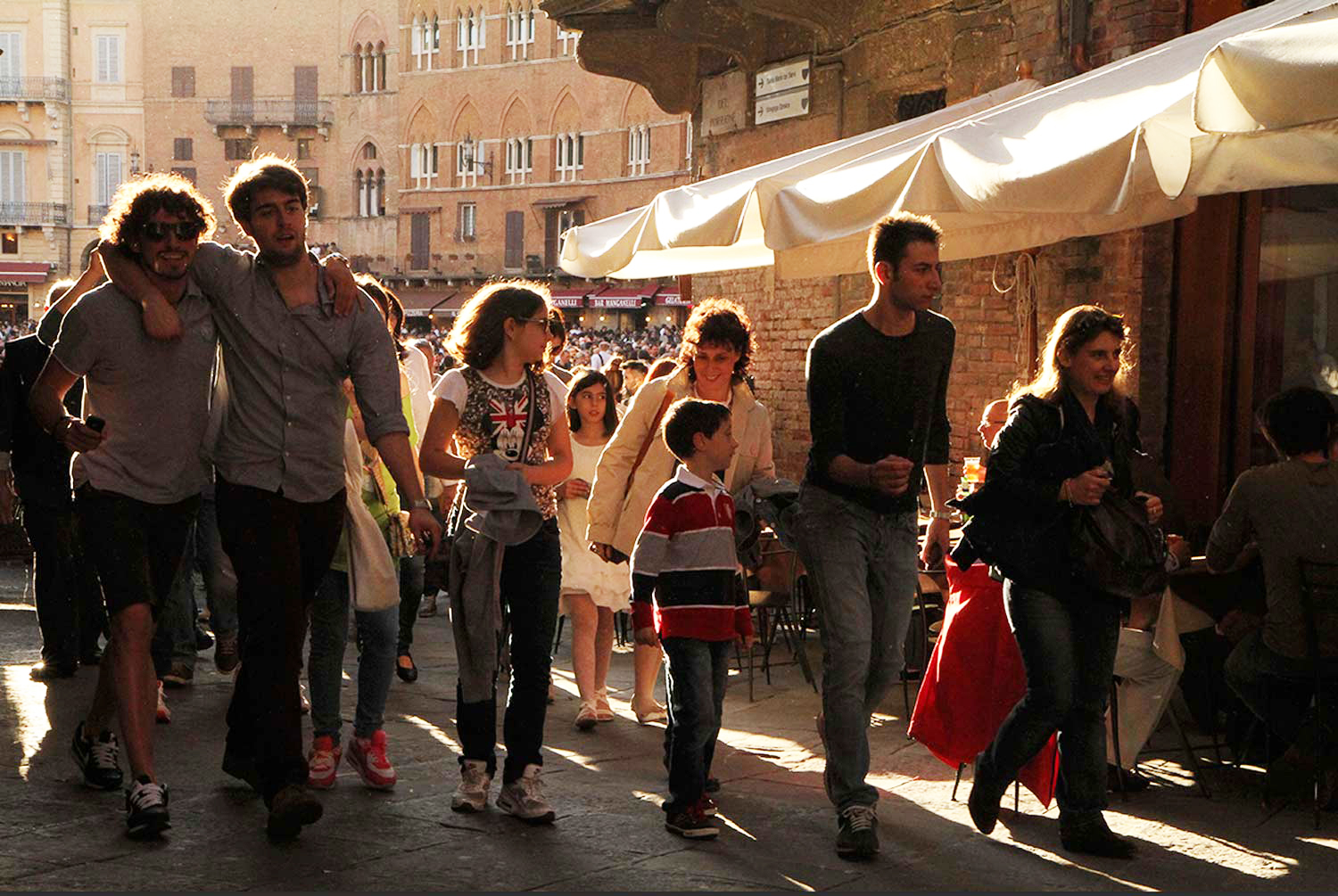
Canice sent me this photo to ask me what I thought. As usual, I like to show what the person said so that others that might be feeling the same thing, or have gone through similar situations can read what was said. Here’s what Canice had to say:
Hi Joe,
Attached is an image I took the last night we were in Sienna during the workshop. You now know why I was late for the last supper !!!
You will recall the square was packed that night and we had arranged to meet up for our final meal on the last night. I had worked my way around the square and figured that if I went up one of the streets leading off the square I might get a shot of some people leaving the square with the sun back lighting them. I hear a lot of photography experts criticizing photos because they say there is no way any highlights should be blown. This has me confused because in this image I feel that the blown highlights on the hair make the image much stronger, What do you think?”
Canice, If I had a dollar for every time I had a fellow photography taking my online class with the BPSOP, or in my “Stretching Your Frame of Mind” workshop I conduct around the planet, tell me that he or she were told by so called “photography experts” to never blow out highlights, I would be sitting by my pool right now, on my island waiting for my French maid to bring me another cocktail. Something blue and frothy with an umbrella hanging perilously from one side.
In my opinion, you should stay as far away from these self appointed experts…why? Because they will lead you down a one-way path…straight down to the burning fires of mediocrity.
WHO ARE THESE PEOPLE, AND WHY ARE THEY CONSIDERED EXPERTS????? If I were Emma Lazarus, and I were also a photographer, I might have written this on the Statue of Liberty for my fellow photographers, not just for the immigrants coming to America:
“Give me your tired, your poor, your huddled photographers yearning to breath free from of all these silly rules. The wretched refuse of your teeming shores. Send these, the narrow thinking photography experts, to me:
I lift my lamp besides the blown out golden door.”
Ok, I digress a tad!!!
I really like your photo!!! I’ll usually go out of my way to backlight something. I’ll also try to blow out the highlights since like you I think it adds a different dimension to it; a dimension filled with Visual Tension and Energy.
Canice, if you remember, some of the ways to generate Visual Tension is the use of light, contrast, and capturing a moment in time and leaving it un-completed. In your photo, you have all three. If i were you I would continue up your dedicated path to glory!!!
One of the most diverse, interesting, and sometimes complicated of all the principles of Gestalt that I teach both in my online class with the BPSOP, and in my “Stretching Your Frame of Mind” workshop I conduct around the planet is referred to as Proximity. If you’ve ever felt that your composition was a little off and you weren’t sure why you might have been suffering from a Proximity flaw.
There are several ways Proximity can add or detract from our photography:
The proverbial tree, lamppost, building, or telephone pole that seems to grow out of your subject’s head is one of the not so good ways Proximity can affect our photographs. I’m sure you have either seen it in other images, or have been guilty of it yourself, but have you ever wondered why you didn’t notice it right before you pulled the trigger (that’s a Texas euphemism) for clicking the shutter?
When we take pictures out in some location, we’re in three-dimensional reality, so it’s easy to see the relationship between one object and another. The problem comes when you try to convey your image that was taken in three-dimensional reality, and display it in a two-dimensional representation…as in a photograph.
Since the photographer is physically present, he or she can tell that a tree or a pole or some object is in the distance and not growing out of someone’s head. That is if the photographer is paying attention.
When a picture is taken that fact is lost; you’ve lost the third dimension, depth. The tree is now in two-dimensional contact with the person and the viewer will interpret the two as being one since they’re both in focus and appear to be on the same plane.
This is a very good reason why you need to study every part of your frame before taking the picture. for those of you that have taken my workshop or class, I talk about my “Fifteen Point Protection Plan”. It’s the best way to see this effect and rectify it…how you ask?
By simply moving over a step.
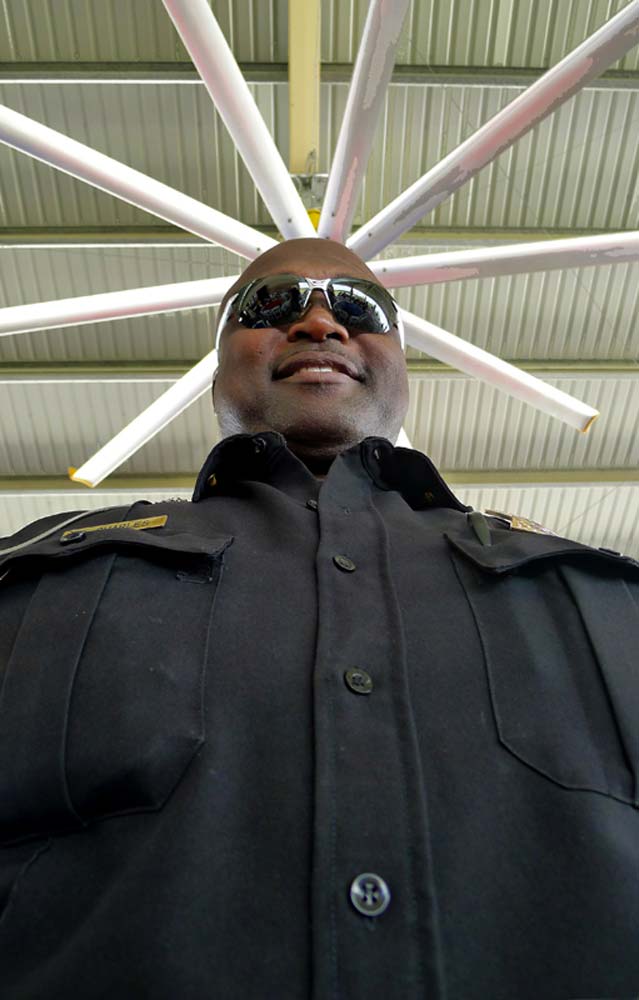
There are times when you can use this flaw to your advantage, and have fun with it; as in the photo above taken by a student in my online Gestalt class, and the photo I created of the cop with the fan on his head.
An intentional use of Proximity.
The funniest example of which I don’t have a photo is when I saw a friend of mine’s five year old putting his thumb and index finger out in front of him aimed at his mother’s head and touching them together several times in rapid succession. I asked him what he was doing and he said that he was pinching his mother’s head. Try it sometime; it’s a great stress reliever, and it was Proximity in action!!!
Stay tuned for more on the effects of Proximity.
Visit my website at: www.joebaraban.com, and be sure to follow me on Instagram: www.instagram.com/barabanjoe. Look for my workshop schedule at the top of this blog. Come shoot with me sometime.
By several definitions, Gestalt comes from the German/Austrian word meaning shape, form, or the whole. It is stated that Gestalt is the theory that the ‘whole’ is greater than the sum of its parts. It is also stated by others that the ‘whole’ is different than the sum of its parts. My thinking is that when you use the “elements of visual design” in your imagery you are basically working with and structuring these ‘parts’ that will eventually make up the ‘whole’; the ‘whole’ being your finished composition.
The methods we use to gain attention to our photography will vary, but what’s important is how we manage what the viewer perceives and processes when looking at the information we lay out to him in the form of a photograph. Visual input is a part of our everyday life, and as photographers, it is our prime objective to present this visual information in a way that takes control of what the viewer sees and when looking at our imagery.
In our reality, making the mind work harder is not necessarily a good thing, but in photography it is. By leading the viewer’s eye around our composition, having them complete an image, or having them consider the scene, they are now participating by taking an active role, and when we can accomplish that our images will definitely be stronger.
When we talk about different ways to keep the viewer involved in our photographs, one of several ways is to have them “complete an image, or a form, or an idea”. The brain has the ability to complete an unfinished form or subject, and this ability in the theory of Gestalt is called closure.
In both my online class with the BPSOP and in the “Stretching Your Frame of Mind” workshops I teach, we discuss and work on the six different ‘concepts’ in the theory of Gestalt. In my part I and part II classes, we work on incorporating the elements of visual design into out photography.
I continue my quest to bring to those of you that discovered photography in the digital era, an idea of what it was like way back when. I’m talking about a time when Adobe was a style of house found in the Southwest part of our fifty states. A time when my producer had to drive around to find a phone booth to call me, a person on our crew, a client, a location scout, etc. A time when you had to create images all by your lonesome, and “in the camera”.
Sound scary? Well it was, as I think back about it!!! However, I didn’t know any difference. It was just something you did, and everyone was on the same playing field. Yes, “those were the days my friend, oh yes those were the days.” When I teach my online class with the BPSOP, and I take my “Stretching Your Frame of mind” workshop around the planet, Photoshop is put on hold. We work on getting photos “in the camera”. I don’t mean to suggest that I never use Photoshop because I do. I just love the ‘content aware’ tool!!!
The challenge for me and one I ask of all my students is to be able to get as much as you can without the use of Photoshop. If there’s one thing I’m sure of in this “crazy mixed up world”, is that it will make you a better photographer, and that’s my goal. I’m not interested in my classes becoming better computer artists, just better shooters.
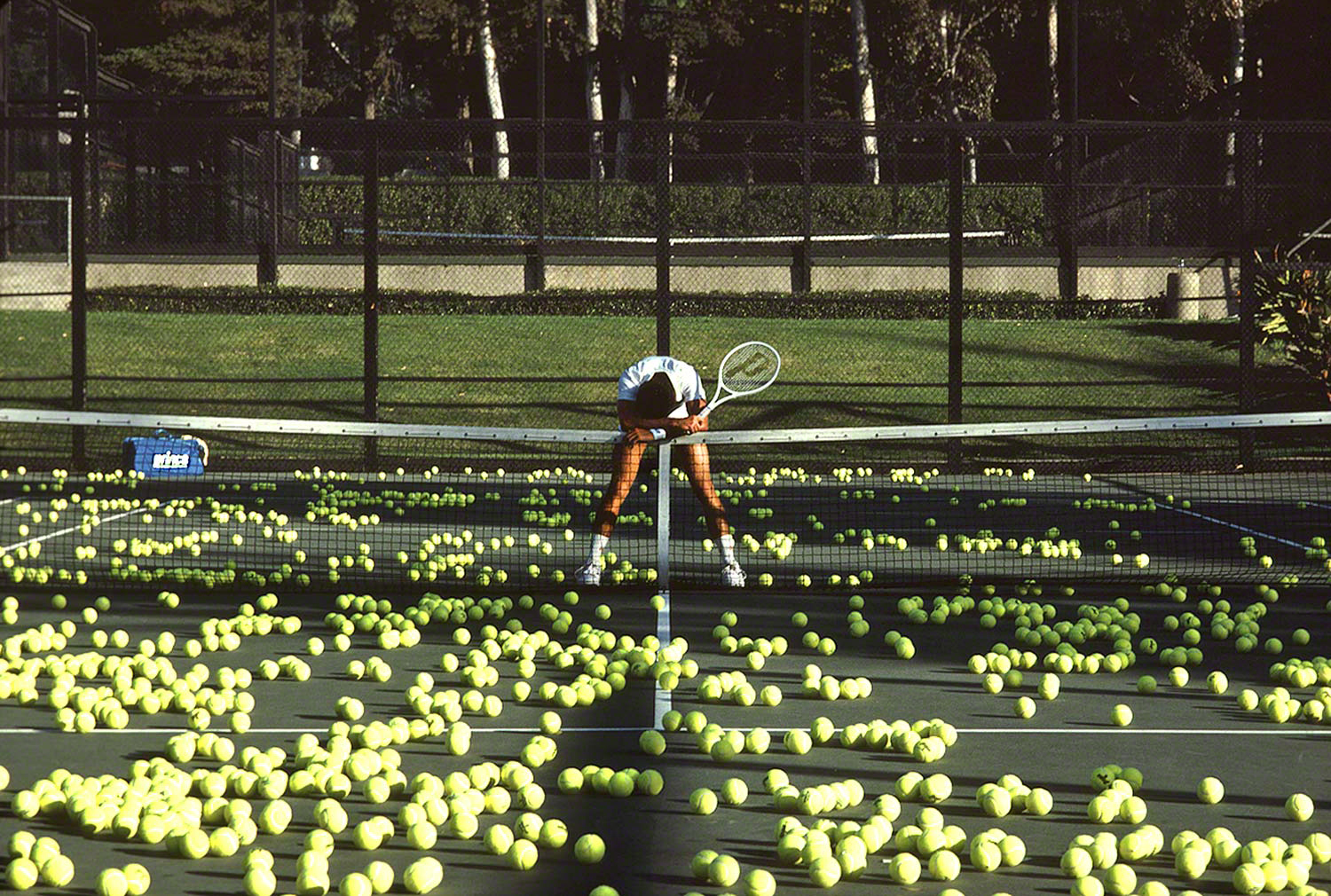
I was shooting a campaign and a series of posters for Prince, the makers of tennis equipment, and the campaign was called, “Let the games begin”. It was about what people will go through to become better players; aside from using Prince’s equipment. The photo above was taken in Santa Barbara, California, and I had scouted several locations with my Sunpath chart and my Morin 2000 hand bearing compass. I knew from those readings that the sun would hit this location at sunset. I stood where I was going to place the tennis player, took a reading with my compass, and determined that he would get perfect late light.
Since most of the work comes in the pre-production stages of a photo-shoot, I was feeling pretty good about the prospects of coming away with a “keeper”. Now, all I had to do was set up the tennis balls, put the model in the right spot, put the Prince blue bag as far away as I could, and still make the client happy, then wait for the light.
Well, here came Murphy’s Law. You know the one, that pesky law that says, “if anything can go wrong, it will. If there’s a possibility of several things going wrong, the one that will cause the most damage will be the one to go wrong.”
So, you’re asking yourself what could have gone wrong? Well imagine everything set up perfect, the late sun shining low and bright, and a Santa Anna wind coming up from nowhere and blowing every tennis ball off the court. Can you imagine? Well, I can tell you that it was just about the last thing that was on my mind, but that’s exactly what happened.
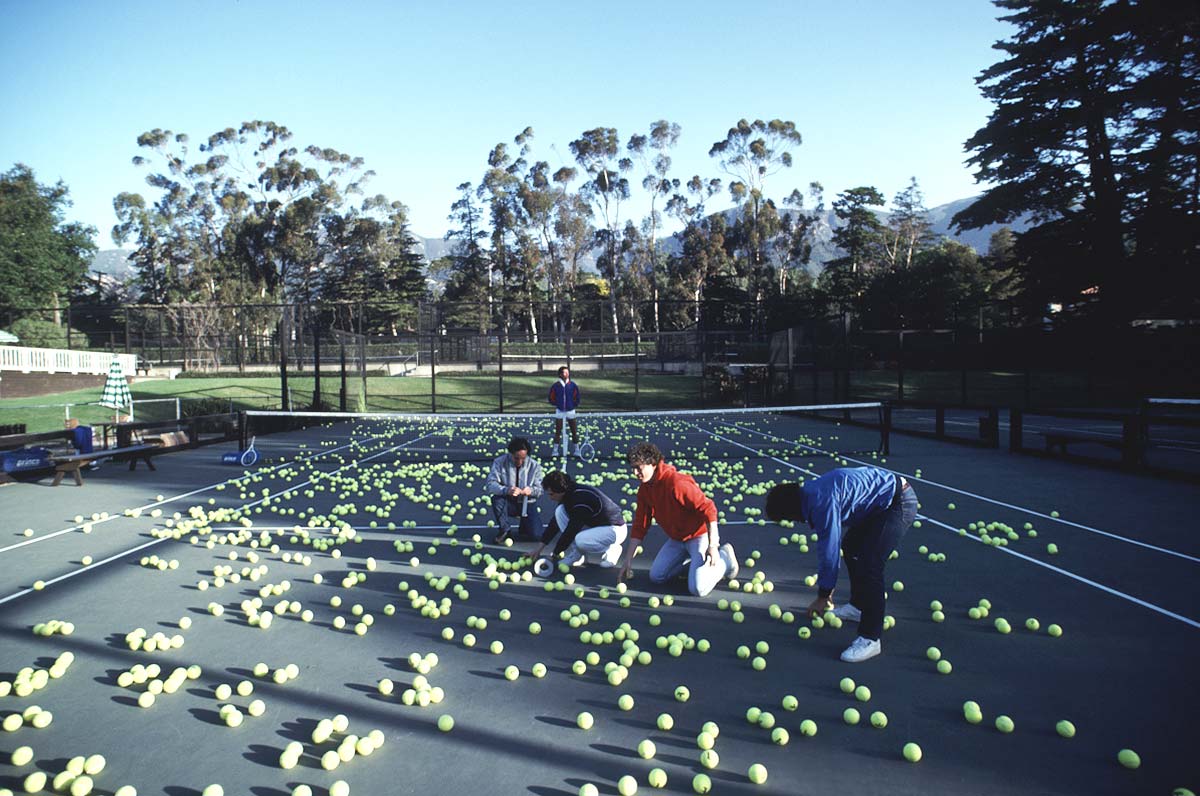
What did I do back then without the help of Photoshop? I did what I had to to make it work. I had everyone grab some Duct tape, tear off several thin strips and secure every ball to the court. So every ball you see has two pieces of very strong sticky tape under it.
This is what people look like when they’re taping tennis balls to the court.
“Oh yes, those were the days!!!
Visit my website at: www.joebaraban.com and follow me on Instagram: www.instagram.com/barabanjoe. Watch for my workshop schedule I’ll post at the top of this blog. Come shoot with me sometime and listen to a million stories just like this one.
Frank S. sent me this photo and said, ” Saw you were open to seeing pics and thought I’d send you this one that just re-surfaced.”
In my online class with the BPSOP, and in my “Stretching Your Frame of Mind” workshops I conduct around the planet, I show people how to incorporate the Elements of Visual Design and Composition in to their imagery. Years and years (a million) ago, this man took my Maine Media Workshop, (which incidentally begins July 30th this year) and along with his close friend, were way above the rest of the class in delivering quality images every day.3
Shooting with me didn’t give Frank his ‘eye’, he had it all along. All I did was to teach him how to use in in a different way. It seems to have stuck because his submission is a very nice portrait!!! Although I’m not a huge fan of combining B/W (or sepia, I think!!!) and Color, this portrait is among one of the few that I really like.
It’s straightforward simple, but compelling at the same time. It hits you in the ‘eye’ like a big Pizza Pie…but with a thin soft crust!!!
For me, her eyes are the strongest part of this photo. As I teach/preach to my students, Line is probably the most important Element on their ‘Artist Palette’ ( a term I use in my workshops), because without Line, nothing else would exist. It takes lines to make patterns, Texture, Vanishing Points, etc., as well as planes, trains, and automobiles..why???? Because planes, trains, and automobiles all have outLINES.
The most important Line is the horizon line, which should always be straight. However, the implied line between the subject and the lens is very powerful, and for that reason, if I’m not having them look out of the frame (see my post on the Leading in Rule), I usually have my subjects looking into the lens.
The exposure was very important here as far as getting the bright background, the skin-tones and her dress to have their own feel/look but to be combined together to make up the finished photo. It might look easy, but it’s not!!!
I recently had a fellow photographer submit this photo into my online class. I always like to include their question so those out there that share the same thoughts, or like to take similar photos can read what they had to say. Here’s what Jean had to say:
“Hello Joe,
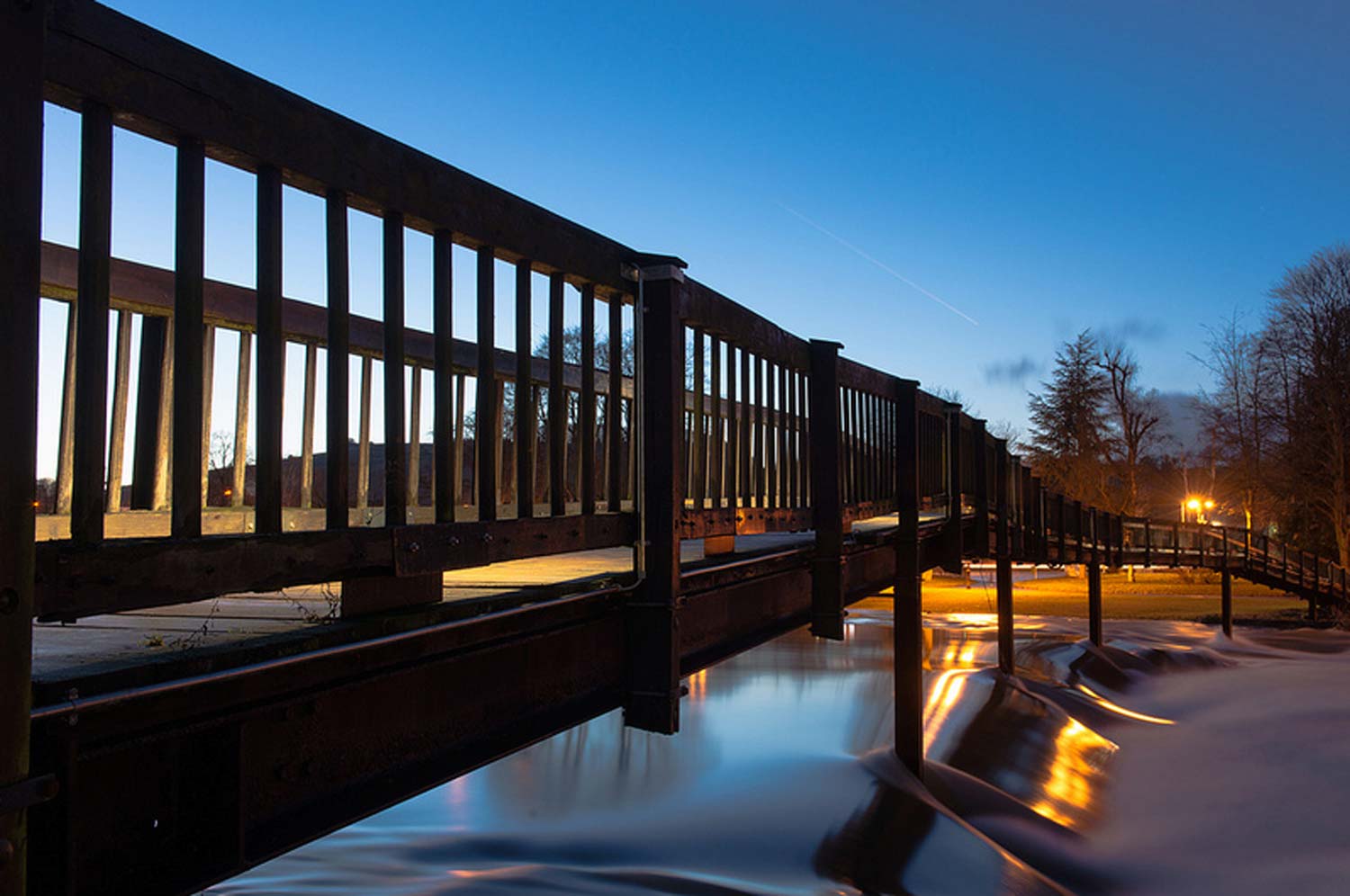
I was in your class last month in your BPSOP and I read your blog coming from and I want to show you one of my ‘motion-freezing’ picture. I’d be glad to hear your critique.
Thanks a lot,
Jean”
First of all I want to comment on the fact that Jean was in my part I class that I teach with the BPSOP. What I teach there is the same material covered in my “Stretching Your Frame of Mind” workshops I conduct around the planet. That said, I hope some of what I have to say has rubbed off on her. From the looks of this photo I must be a good teacher because it’s a very strong image; it’s filled with the elements of design and composition that I show people how to use in order to take their imagery what I refer to as “up a notch”.
Ok Jean, let’s talk about it.
It’s a really nice photo that takes the viewer on a ride through the frame via the bridge and the water. Visual direction is sooooo important when keeping the viewer an active participant. The more ways we can get the viewer to leave and enter our frame the more energy he or she will use…and that’s a good thing!!! It’s what I teach in my new Gestalt class.
As far as freezing the motion, I think you might really be meaning something else…why? Because you haven’t frozen the motion. By using a long exposure, you’ve made the water look almost placid, with no ripples that would catch the light accentuating them and say movement. If you had shot at a shorter exposure, it might have looked like you had frozen the water and their would have been a different kind of texture than the smooth type you created here. It’s something I would have tried both ways.
That’s not necessarily a bad thing, in fact it usually creates an almost ethereal feeling. However in this example, I think the reflections of the sky in the water being so smooth may not be a “quick read”. At the bottom of the small waterfall, it looks a little like a low covering fog bank. The part of the reflected water appears as it it’s disappearing under the fog. It appears as though the water is cascading over some kind of rock structure that’s rendering the reflections somewhat weird and perhaps a little hard to understand. That’s not a bad thing either!!! It’s also hard to tell where the water ends and the deck (I think) begins.
I think it’s still a beautiful photo, beautifully lit, perfectly exposed, and well composed. There’s lots of things for the viewer to discover and enjoy, and it’s one you should be proud of.
Btw, remember that showing a subject and its reflection is one of the ways to create Visual Tension, and that’s one of the reason your photo attracts the viewer in the way he perceives then processes the information.
Thanks for sharing it on my blog.
Visit my workshop at: www.joebaraban.com and follow me on Instagram: www.instagrm.com/barabanjoe. Also check out my workshop schedule at the top of this blog. Come shoot with me sometime.
Most of you will know Johnathon Swift as the guy that wrote Gulliver’s Travels; one of the few books I read more than once. Among a much smaller crowd, he’s known for a quote he said a long time ago. A quote I have read once or twice in the past forty years as an advertising, editorial, and corporate photographer. He said, ” Vision is the art of seeing what is invisible to others”.
As I often tell my fellow photographers that sign up for my online classes with the BPSOP, or the ones that shoot with me in my “Stretching Your Frame of Mind” workshops I conduct around the planet, use the Elements of Visual Design to help you “see past your first impressions”. If it’s a tree, then what else is it? It’s an object made up of Texture, Patterns, Form (when side lit) Shape, and most important Line. It’s about the Negative Space between the branches that are defining those leaves and branches.
Depending on the time of day, it’s about the shadow the tree creates. When shot early in the morning or late in the day when the sun is gone the tree becomes a two-dimensional silhouette against a brighter sky. It’s all these things that most people can’t see…why, because they just don’t know how to see… with the right vision.
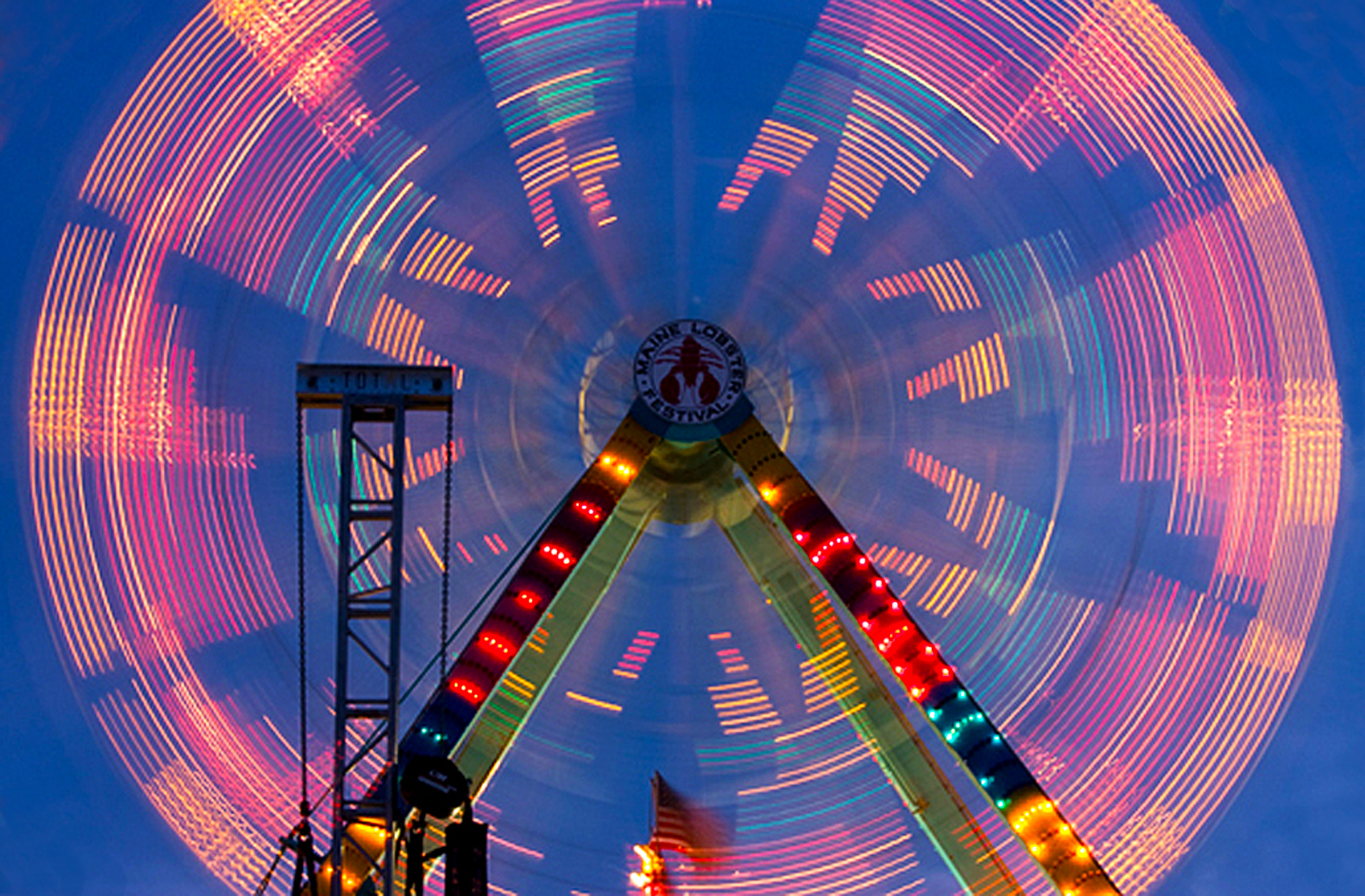
In the above photo, the left side of my brain, the analytical side, saw a Ferris Wheel. The right side, the creative side saw motion, a circle, a triangle, patterns, lines, light, and color.
Once you learn how to see with this vision, a whole new set of photo opportunities will be at your disposal. no longer will you say that when you went out shooting, you just didn’t see anything interesting. There’s ALWAYS something interesting to shoot.
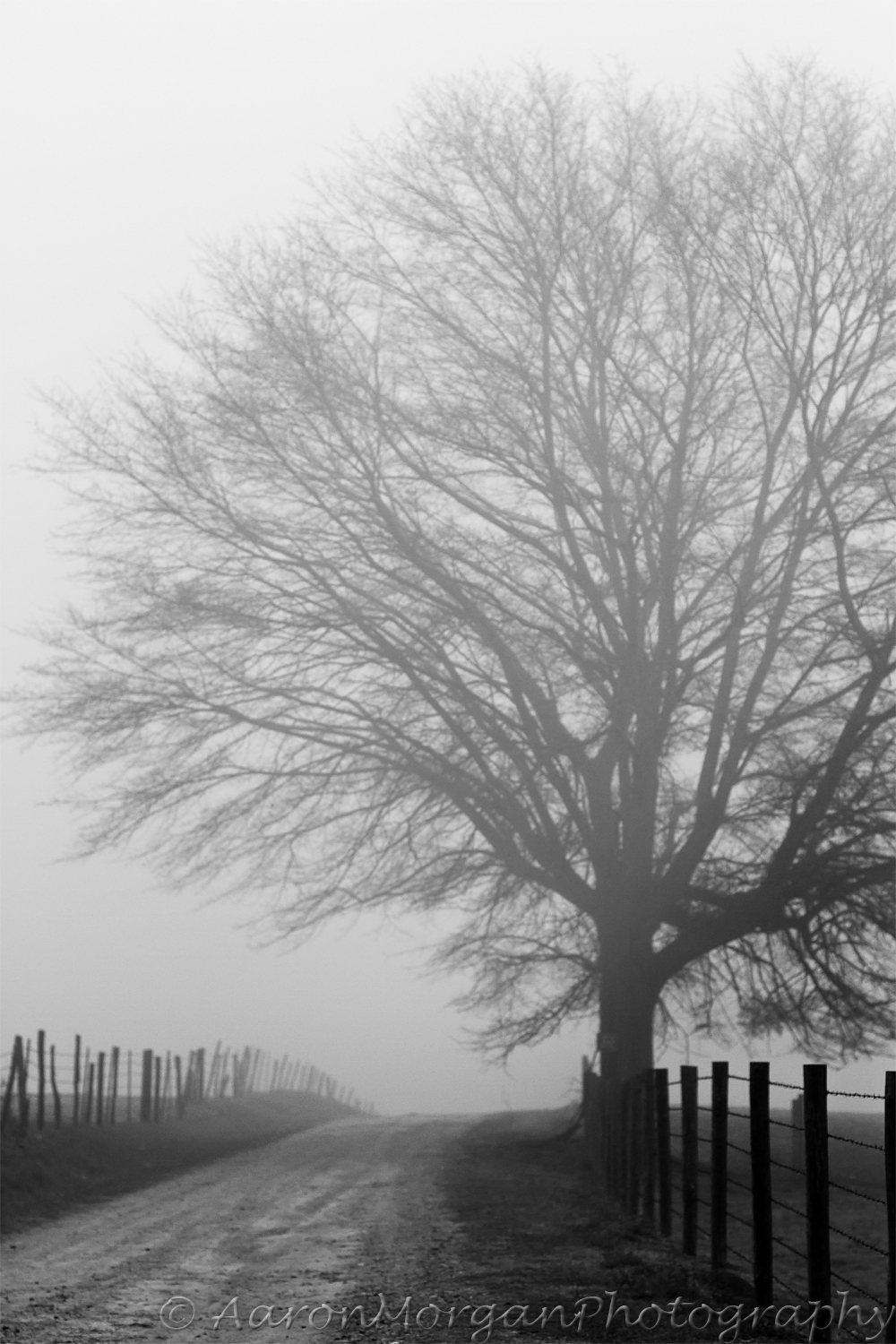
Aaron from Georgia sent me this winter scene for a critique. Here’s what he had to say:
“Hi. I would like a critique on this image. This is one of the better images I have captured for a seasonal winter album. Like all the other pictures in this set, when I squeezed the shutter button, I was attempting to convey a sense of loneliness, cold and mystery. I took about 30 frames at this road near a farm in Eatonton, Ga. On each frame I was looking to use the road and fences as lines to pull a viewer’s eyes into the fog. (Each frame was a little different in composition.) I used a very selective depth of field, focusing on the first fence post on the bottom right of the frame. The image is photo shopped – In ACR, I adjusted exposure, increased the blacks, contrast and clarity. I also sharpened (what little depth of field there is) with ACR. In Photoshop I adjusted the levels.
So my question is: Does this photo convey the feelings of loneliness, cold and mystery well?”
Aaron, although it’s a very nice photo, I can only wonder what it looked like before all the post processing work??????? I also wonder what you would have done before the days of the digital era and specifically Photoshop???? It sort of reminds me of a conversation I had a while back with a student of mine in the class I teach with the BPSOP. She had a similar photo, not as far as a winter scene like yours, but a similar photo with quite a bit of post work. I told her that her photo reminded me of a woman I went out with once (and I do mean once).
Unfortunately, I found out the hard way that in order for her to look good, she would put on high heels (for additional height), a padded bra, fake eyelashes, colored contact lens, and extensions for her dyed hair. It just struck me funny when you mentioned all the things you did to this photo to make it look good. I realize that this is the way it is now with the digital age and so many photographers that have only seen and composed through a digital camera, are thinking about Photoshop as a way of making their photo look better. I wonder what your photo looked like before you worked on it? I wonder if I could have taken this same photo and made it look good the way I would if I was still printing in my darkroom simply by burning and dodging, the right initial exposure, and the right grade of paper?
Hummm, but I digress!!!
Ok, the first thing I wonder is what lens you used, and what aperture you had it set on. The reason I ask is because you said you used a shallow depth of field, but it seems as if all of this composition is in focus. If you had used a wide angle lens and you had it focused at infinity, then everything would have been sharp no matter what you had it set on. To me, it feels like the fog is making everything look soft.
As far as it looking cold, this kind of fog happens any time of the year just about anywhere in the country. I’ve taught a workshop where we had this exact light and fog most of the week. It was very sad since back then the name of my workshop was called “The Poetry of Light”. The class had a T-shirt made for me that said my class was now called “The Poetry of Fog. This was in August.
If you want to say cold, without being there to tell the viewer that it was indeed cold, you have to say it visually. You know it was cold because you were there, but will someone else that wasn’t there?
You do achieve a sense of Mystery and certainly Loneliness simply because of the fog, and the fact that you can’t see what’s over the hill. Loneliness also comes into play since there’s no one around.
The best part of this photo is the way you used Continuance (a concept of Gestalt) to lead the viewer down the road and fence line. You absolutely achieved that. The fence line is a very strong directional element that is very close to being a Vanishing Point which has created a sense of depth.
It’s a good photo Aaron, and thanks for submitting it to me.
In my online class with the BPSOP, and in my “Stretching Your Frame of Mind” Workshops, We spend a lot of time on color, since it’s one of the elements on my ‘Artist Palette’ and so important in taking our photography what I refer to as “Up a Notch”. Color is a stimulant for our eyes, and ties the elements of a photograph together. Color affects every moment of our lives, and has an enormous impact on our photography.
Coming from a background in color theory, painting and design, I have over the years trained my eye to look for color, and it often requires looking past your initial impression. Since my background is also in Journalism (as in a BA) I love to write and tell stories. Now, my medium is photography, so I use color as my way of communicating my ideas.
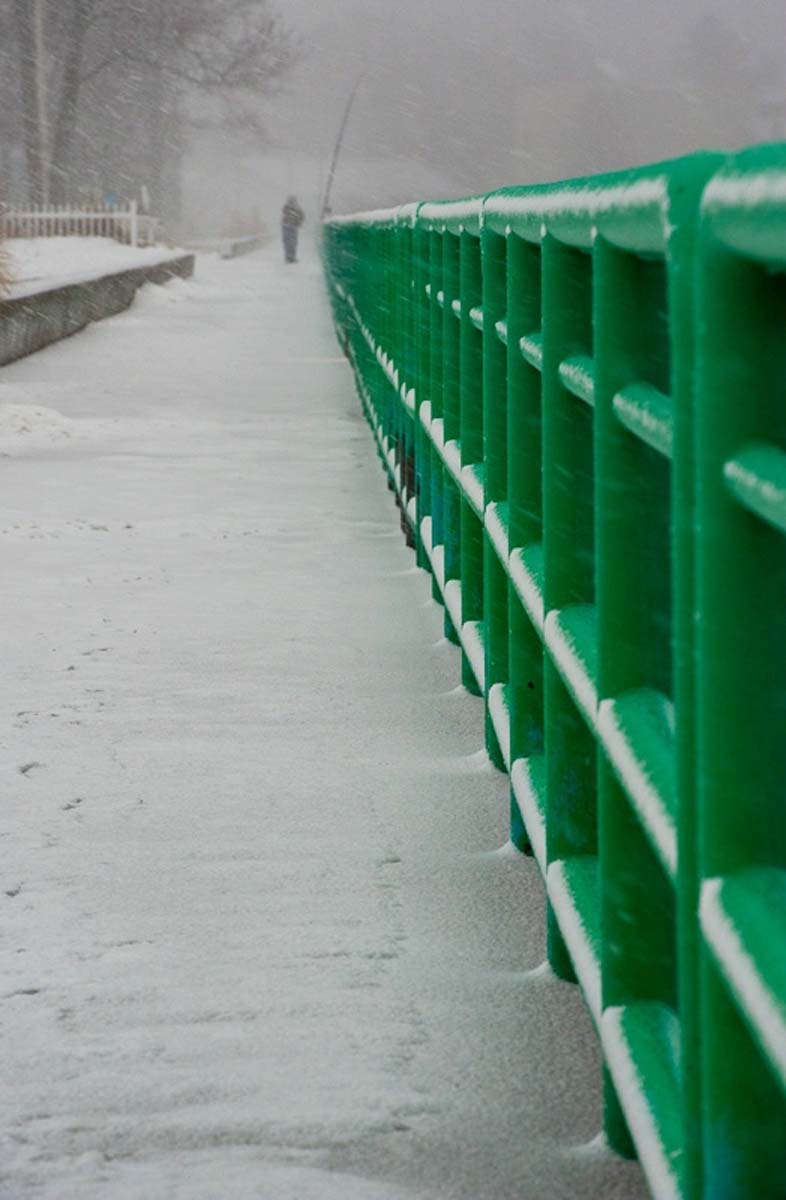
Nothing can help a photographer more than when he’s forced to shoot in bad light or just wants to venture out on a snowy day. Paul, a recent student with me at the PPSOP went out during our class with his ‘Artist Palette‘ (always in the back of his mind) and found this amazing location. Since we had started working on Vanishing Points and Directional lines, and how they can add depth to our imagery, he had hit the photo jackpot!!!
I can assure you that very few photographers would compose this photo so that the green railing would form a Vanishing Point and lead the viewer down the road to the man perfectly framed at the end. Also Paul,” seeing past first impressions“, knew that the green would have an enormous effect on his composition while communicating an idea. Moreover, on several occasions, I’ve had one of my students tell me that it was overcast and decided that there was nothing to shoot on such a gray day…and I love it when they do!! Every time they say that I just whip out this image that Paul shot and “let them eat crow”.
Paul has also done a great job in using one of the concepts in the theory of Gestalt I teach called Continuance.
I would have no problem telling people that I had shot this photograph…BRAVO!!!